.jpg
)
.jpg
)
.jpg)
If you've been hanging out in Android customization subreddits or doom-scrolling TikTok recently, you've probably stumbled across "Liquid Island APK." People are posting their phone setups with this liquid glass dynamic island effect running on completely stock Android devices — and honestly, some of these setups look really good.
It's the kind of change that makes your phone feel like a different device without buying new hardware or going anywhere near a custom ROM.
Liquid Island APK is a personalization app that brings a fluid, glassy dynamic island-style notification experience to Android. Think Apple's Dynamic Island, but with a liquid glass look, way more customization options, and built for Android from the ground up. No iPhone 14 Pro needed. Just the APK, a few minutes, and you're set.
This guide explains what the app does, how it works, what is worth configuring and how to safely install it. If you found this because of a TikTok video, or you’re just looking for something to make your Android less generic, read on.
📌 What Is Liquid Island APK? – The Personalization App Explained
Liquid Island is an Android personalization app that overlays a dynamic, liquid glass-styled notification island on your phone's screen — usually sitting right near the top where your camera punch-hole or notch is. It takes that dead-zone status bar area and turns it into something interactive. Notifications, music playback, incoming calls, battery status — the island reacts to all of it.
The "liquid" part is not just a name. The animations are really smooth and the translucent glass look adds a little more life to each notification interaction. A WhatsApp message comes in and the island stretches open with a ripple effect.
You're playing music and it shows playback controls with this fluid motion visual. It's one of those small UI details that makes a phone feel more considered and premium — the kind of thing you'd normally only see on flagship software.
This sits purely in the personalization category. It doesn't touch your launcher or icon pack. It completely changes the top part of your screen and how it behaves. The fact that it's been trending under searches like 'Liquid Island APK setting', 'Liquid Island APK config', and 'how to download Liquid Island' says a lot about the traction it's gotten.
To work, the app needs Accessibility Service and Notification Access permissions — that's standard for any overlay app that operates at this level on Android. It's not using those permissions to collect your data; it reads notification content so it can display it inside the island and that's it.
🎨 How Does It Work? – A Look at the Liquid Island Experience
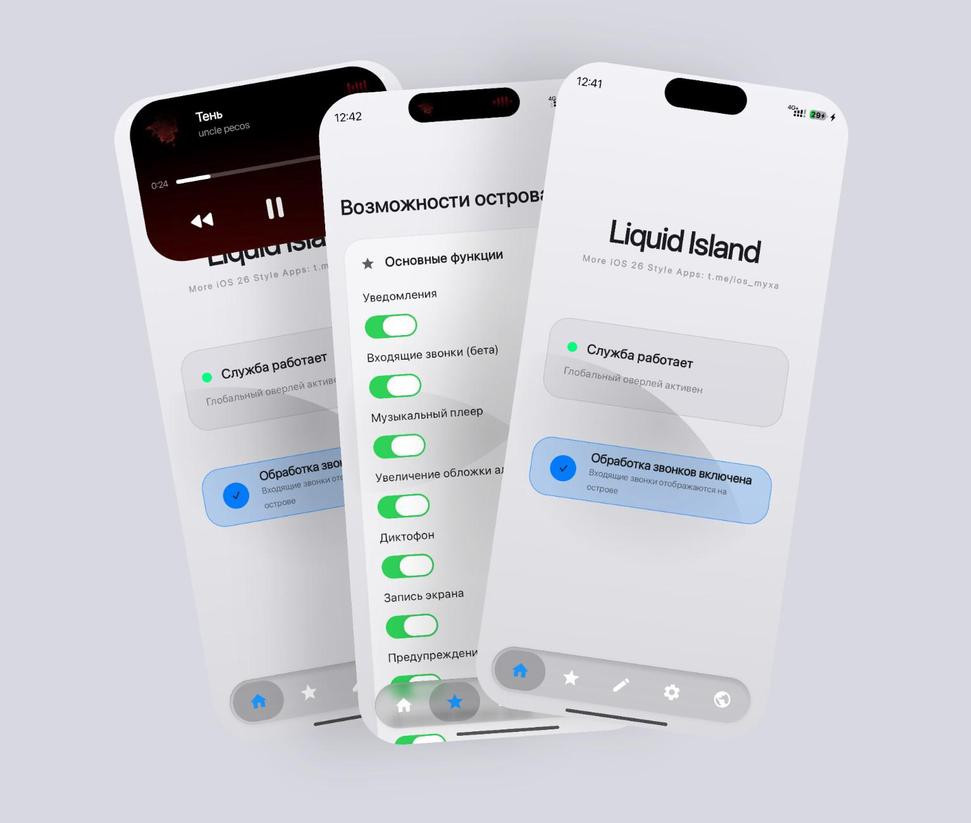
Once installed and configured, Liquid Island operates as a permanent overlay. At the top of your screen is an animated pill-shaped island that responds in real time to whatever you’re doing on your phone.
This is what it actually looks like day-to-day:
When there’s nothing happening, the island is just there, a little glassy pill next to the camera notch. You hardly notice it. Then there’s a notification—a text, a social media alert—and it expands fluidly to show you the content.
Just tap it and it goes right to the app you need. The island becomes a mini playback controller when music is playing, showing the track name and controls to play/pause and skip, without having to pull down the notification shade.
Incoming calls pull up the caller's name with quick accept/decline options right there in the island. Even charging shows up — the island can display live battery percentage with a visual charging indicator while your phone is plugged in.
The configuration side (what people usually mean when they search "Liquid Island APK setting") covers the island's size, position, how far from the top edge it sits, animation speed, edge glow color, and which notification types actually trigger it to expand. That's where the real personalization happens — you can dial it in to match your wallpaper, your icon style, your whole phone aesthetic.
✨ Key Features of Liquid Island APK – What It Actually Offers
💧 Liquid Glass Animation Style
Everything the island does — expanding, contracting, morphing — uses smooth fluid animations with that translucent glass look. It's not a static bar that appears and disappears. It actually moves in a way that's genuinely satisfying to watch after a while.
🔔 Smart Notification Display
The island picks up incoming notifications from messaging apps, social platforms, email, and more. It briefly expands to show the relevant content, then retracts. You stop reaching for the notification shade every five minutes for quick glances.
🎵 Integrated Music Playback Controls
While audio is playing, the island becomes a compact music widget - play/pause, previous track, next track and a touchable seek bar on some configurations. Compatible with Spotify, YouTube Music, and most regular Android media players.
📞 Dynamic Call Display
Incoming calls add the caller's name and answer/decline controls to the island so the full call screen doesn't take up your entire display.
🔋 Charging and Battery Status
You can choose to show a live battery percentage or a visual charging animation on the island when your phone is charging.
🎨 Fully Customizable Appearance
Size, corner radius, top margin, background opacity, edge glow color, animation style, how long it stays expanded — all adjustable. You can get pretty specific with this if you want to.
📍 Adjustable Position and Size
Not all Android phones have the punch-hole camera in the same position. Liquid Island lets you move the island both horizontally and vertically until it lines up with your real camera cutout wherever you want.
🌗 Works With Your Existing Launcher
This layers on top of whatever launcher you're already running — Nova, One UI Home, MIUI, anything. It doesn't replace what you have. It just adds on top.
⚡ Lightweight Performance
The visual effects don't come at a real performance cost. The overlay is optimized well enough that most people won't notice any battery impact or lag.
💡 Benefits of Using Liquid Island APK – Why It's Worth Installing
The visual upgrade is obvious, but there's some actual practical value here too.
If you get a lot of notifications throughout the day, having them pop up right at the top of your screen in a compact format means you’re not having to pull down the notification shade. It's a little thing, but you see it. Quick glances at messages, caller IDs and now-playing info are right where your eyes already go.
It also closes the gap between Android and the polished UI experience that iPhone users point to when they justify their hardware choice. Apple's Dynamic Island was a clever bit of design thinking — taking the camera hardware constraint and turning it into a feature. Liquid Island takes that same concept and brings it to Android, and without any root or system level changes.
This is one of the more visually impactful single changes you can make without overhauling launcher or icon pack, for those who actually enjoy customizing their . And because the config options are quite deep, two people with the same app can have setups that look nothing alike.
It's also completely free. No subscription, no premium tier locking the good stuff behind a paywall.
🛠️ Tips to Get the Most Out of Liquid Island APK – Setup & Config Guide
📐 Align the Island to Your Camera Cutout First
Do this before anything else. Go into position settings and get the island sitting precisely over your camera punch-hole or notch. A slightly off-center island looks wrong; a perfectly aligned one looks like it was designed that way. That one adjustment makes the biggest difference in how the whole thing reads.
🎨 Match the Edge Glow to Your Wallpaper
The edge glow is subtle but it adds a lot of cohesion. Pull the dominant color from your wallpaper using a color picker app and plug that hex value into the glow setting. When your wallpaper and the island feel like they belong to the same visual system, the whole setup looks intentional rather than thrown together.
📳 Configure Notification Filters
You don't need every app triggering an island expansion. Go into the notification settings and limit it to apps you actually care about — messaging, music players, phone calls. Letting random background apps fire the animation constantly gets old fast and undercuts the whole effect.
⏱️ Adjust Expansion Duration
The default expansion time might feel too quick or too drawn out depending on how you use your phone. Find the duration setting and tune it. Most people land somewhere between 3–5 seconds for notification previews, but it's worth testing both ends.
🌙 Test Dark and Light Modes Separately
The liquid glass effect looks noticeably different depending on your phone's dark/light mode. Check your opacity and glow settings in both and find a middle ground, or save two separate config presets and switch between them.
🔄 Restart the Accessibility Service After Updates
If the island stops working after an app update, toggle the Accessibility Service off and back on before doing anything else. Settings → Accessibility → Liquid Island, disable it, wait a few seconds, re-enable it. That fixes it most of the time.
📸 Share Your Config on TikTok or Reddit
The community around this app is genuinely active and people share their configuration screenshots regularly. Putting yours out there helps others recreate your setup and you'll pick up ideas from what everyone else is doing too.
📥 How to Download and Install Liquid Island APK – Step-by-Step Guide
Since Liquid Island APK isn't on the Google Play Store in every region, the most reliable way to get it is through a trusted APK platform. APKview.com is a solid option — it performs safety checks on hosted files and gives you clean, direct downloads without the usual maze of misleading redirect buttons.
Here's how the full installation goes:
Step 1 – Open your Android browser and head to APKview.com. Search "Liquid Island APK" and find the latest version.
Step 2 – On the app page, confirm it's listed under the Personalization category. Check the version number and tap Download. The file is small, so it pulls down quickly.
Step 3 – Go into your phone's Settings. Navigate to Security (or Privacy on some Android skins like MIUI or ColorOS) and find "Install Unknown Apps." Enable it for your browser. This lets you install APK files from outside the Play Store.
Step 4 – Open your Downloads folder and tap the Liquid Island APK file. Hit "Install" when prompted. Takes a few seconds.
Step 5 – Open Liquid Island from your app drawer. On the first launch it walks you through two permissions: Notification Access and Accessibility Service. Both are required for the app to function.
Step 6 – Grant both. For Notification Access: Settings → Notifications → App Notifications → Liquid Island → Allow. For Accessibility, the app navigates you directly to the right screen — just toggle it on.
Step 7 – Head back into the Liquid Island app and start setting things up. Position, size, glow color, which apps trigger the island. The changes go live immediately.
Step 8 – Test it by playing a song or sending yourself a test notification. You'll see the liquid glass animation in action.
🔒 Is Liquid Island APK Safe to Use? – What You Need to Know
This is worth actually thinking through before installing any app that needs Accessibility Service access, because that permission level has been abused by sketchy apps in the past.
Here's the honest picture: the two permissions Liquid Island needs — Notification Access and Accessibility Service — are both genuinely required for any Dynamic Island-style overlay to work on Android.
There's no workaround. Reading notification content and drawing a persistent overlay on screen both need these permissions. Other well-known apps like dynamicSpot and Dynamic Bar operate the same way and have been used by millions of people without incident.
The real variable is where you download it from. Stick to APKview.com or another reputable APK platform that actually scans files before hosting them. Before installing, you can also drag the APK into VirusTotal.com — it scans the file across 70+ antivirus engines in under a minute. A clean result means you're good.
After installing, keep an eye out for anything unusual. If the app starts asking for permissions it has no business needing — contacts, SMS, camera, location — uninstall it immediately. A legitimate personalization app only needs to read notification metadata. It doesn't need your contacts list or location data.
Keep Google Play Protect enabled even when you're sideloading apps from outside the Play Store. It keeps scanning installed apps regardless of where they came from.
Bottom line: if you download it from a trusted source and take a minute to verify the file beforehand, Liquid Island APK is safe to use.
⚖️ Pros and Cons – The Balanced View
Pros:
✅ Genuinely changes how your Android's notification area looks and feels
✅ No root access required, no system modifications
✅ Works alongside any Android launcher — doesn't interfere with what you have
✅ Deep customization: position, size, glow color, animation speed, notification filters
✅ Functional features beyond just looks — music controls, call display, battery status are actually useful
✅ Completely free, nothing locked behind a paywall
✅ Lightweight — no noticeable hit to battery life or performance
✅ Active community sharing configs and tips regularly
Cons:
❌ Accessibility Service requirement is a higher permission level than most apps — worth understanding before you install
❌ Not on Google Play in all regions, so sideloading is necessary
❌ Behavior can vary slightly across Android manufacturers — Samsung One UI, MIUI, and ColorOS all handle overlays a bit differently
❌ May need reconfiguration after major OS updates
❌ No built-in backup or restore for configuration settings yet
🌐 Liquid Island APK vs Other Dynamic Island Apps – How Does It Compare?
The main competing apps are dynamicSpot, Dynamic Bar, and iLiquidGlassOS. Here's where things actually differ.
The biggest differentiator is the animation quality. dynamicSpot is functional and has a large user base, but the animations feel more mechanical — the island expands, shows content, collapses, repeat. Liquid Island's animations feel more organic and fluid, which is the whole point of the name. If you're picking based on how it looks, Liquid Island is the better choice for most people.
iLiquidGlassOS is a different thing entirely — it's primarily an icon pack with matching wallpapers, not a dynamic notification overlay. Similar name, different category. If you want both the full icon pack treatment and a dynamic island effect, you'd actually run both apps at the same time.
Dynamic Bar is more established and offers similar notification overlay functionality, but it doesn't lean into the liquid glass animation style the way Liquid Island does. If animation quality is what you care about, Liquid Island has the edge.
For people who found it through TikTok specifically because of how it looks — it delivers exactly what those videos showed.
🏁 Final Verdict – Should You Download Liquid Island APK?
If you want your Android to look genuinely different without spending money on new hardware or spending hours setting up a custom ROM, Liquid Island APK is one of the most impactful single changes you can make. Setup takes under ten minutes. No root required.
It works with whatever launcher and theme you already have. The animations are legitimately well-done, and the functional side — music controls, notification previews, call display — means it actually adds something useful, not just something pretty.
The permission requirements are worth understanding before you install, but they're entirely standard for this type of app and not a red flag when you're downloading from a clean source like APKview.com.
It's free. It runs light. Configuration is straightforward. And right now it's one of the most talked-about personalization apps across Android communities. Spend ten minutes in the config screen and see what your phone looks like. Most people who try it don't end up removing it.